Unified API request flow
This page traces one Unified API request, a Salesforce crm/accounts list call, through every step Truto runs, from the account checks to the response.
Skip the reading — fast path for coding agents
CLI
truto unified crm accounts -a <integrated_account_id> -q name=Truto
Skill
View truto skill on GitHub
Cursor / Claude Code:
/skill truto
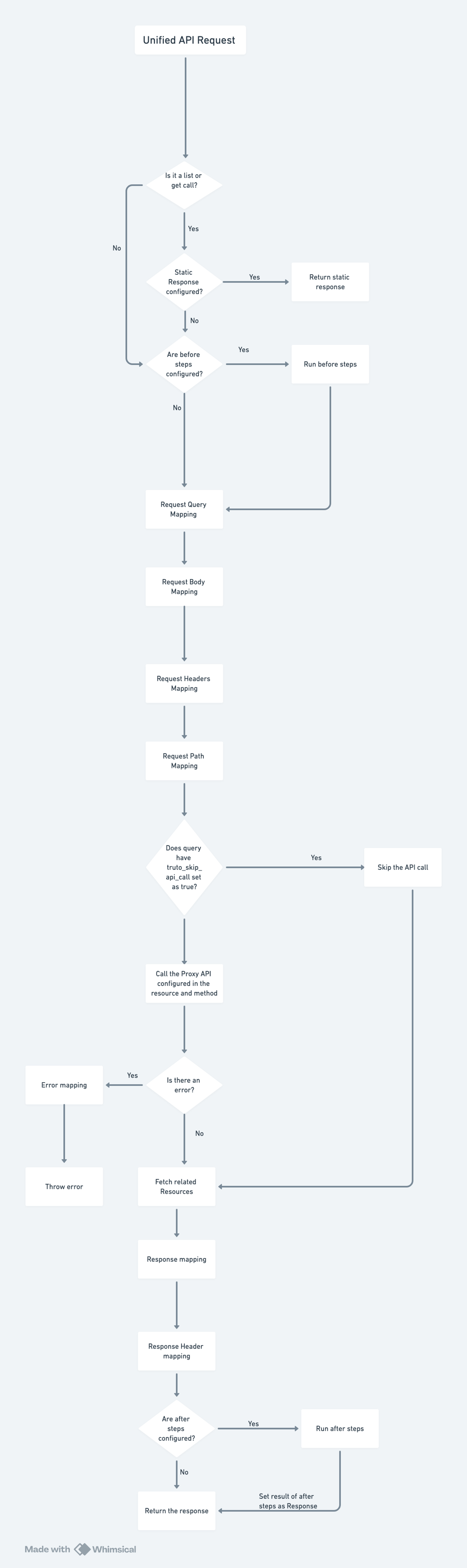
- Unified API Request
- What Happens Here?
The process starts when your application calls a Unified API endpoint for an integrated account. For example:- Request:
GET /unified/crm/accounts?integrated_account_id=<integrated_account_id>&name=Truto&city=Bangalore
- Request:
- What Happens Here?
- Check the integrated account
- What Happens Here?
Before anything else runs, Truto refuses a call for an integrated account that is paused as stale with401andtruto_error_code: integrated_account_needs_reauth, and a call for a blocked account with503. A call to a Unified API that isn't installed in the account's environment returns404.
- What Happens Here?
- Is it a
listorgetcall with static mapping?- What Does This Mean?
Checks if the Unified API call is alistorgetcall. If it is, andStatic Mappingis enabled, the API call isn't made and theStatic Responseconfigured is returned.
- What Does This Mean?
- Check the request body
- What Happens Here?
On acreate,updateor custom method call withtruto_enforce_write_schema=true, Truto checks the body against the method's request body schema. If a required field is missing, the call returns400and nothing else runs. See Unified API parameters.
- What Happens Here?
- Are before steps configured?
- What Does This Mean?
Checks if there are any "before steps" configured for preprocessing the request. These steps are optional but can enhance or validate the request or fetch additional data which will be used in the Unified API call.
- What Does This Mean?
- Run before steps (if configured)
- What Happens Here?
If before steps exist, they are executed.
- What Happens Here?
- Request Query Mapping
- What Happens Here?
Maps or converts query parameters to match the requirements of the API (e.g., Salesforce). - Example:
- Unified API Query:
{ "name": "Truto", "city": "Bangalore" } - Mapped Query for Salesforce (Truto's Salesforce mapping selects more fields; the list is shortened here):
{
  "q": "SELECT Id, Name, BillingCity FROM Account WHERE Name LIKE '%Truto%' AND BillingCity LIKE '%Bangalore%'"
}
- Unified API Query:
- What Happens Here?
- Pick the integration resource and method
- What Happens Here?
Truto works out which of the integration's resources and methods to call from the mapping's Resource and Method. A mapping can pick them per call, from a query parameter, a body field or a JSONata expression. Truto's Salesforcecrm/accountsmapping calls thesearchresource when the request hassearch_term, and theaccountsresource otherwise, as in this example. See Advanced mapping options.
- What Happens Here?
- Request Body Mapping
- What Happens Here?
Adjusts or transforms the request body before sending it to the API. If the caller's body has aremote_dataobject, Truto merges it over the mapped body, so a caller can send provider fields the mapping doesn't cover. - Example:
- Unified API Body:
{ "name": "Acme Business", "website": "www.acme.example" } - Salesforce Mapped Body:
{
  "Name": "Acme Business",
  "Website": "www.acme.example"
}
- Unified API Body:
- What Happens Here?
- Request Headers Mapping
- What Happens Here?
Ensures required headers are included and formatted correctly.
- What Happens Here?
- Request Path Mapping
- What Happens Here?
Maps the API path from the Unified API to the provider API’s endpoint.
- What Happens Here?
- Does the query have
truto_skip_api_callset totrue?- What Happens Here?
Checks if the request includes a flag to skip the actual API call. When it is set, Truto calls neither the provider API nor any related resources, and runs the response mapping on an empty response (responseis an empty string). The response mapping decides what is returned, for example a result built fromcontext.before,queryorcontext. - Example:
- Input:
GET /unified/crm/accounts?integrated_account_id=<integrated_account_id>&truto_skip_api_call=true. - Output: Skips the Salesforce API call and related resources; the response mapping runs with an empty
response.
- Input:
- What Happens Here?
- Call the Proxy API configured in the resource and method
- What Happens Here?
Sends the actual request to the provider API (e.g., Salesforce). - Example:
- Translates:
- Unified API:
GET /unified/crm/accounts. - API:
GET /services/data/v57.0/query, with the mapped query as itsqparameter.
- Unified API:
- Translates:
- What Happens Here?
- Is there an error?
- What Happens Here?
Checks if the API returned an error (e.g., 404 Not Found or 500 Internal Server Error).
- What Happens Here?
- Error Mapping (if there's an error)
- What Happens Here?
Converts errors into a standardized format. - Example:
- Salesforce Error:
{ "errorCode": "INVALID_FIELD", "message": "The field 'xyz' is not valid" } - What the error mapping returns:
{
  "status": 400,
  "message": "Invalid request. The field 'xyz' is not supported."
}
- Salesforce Error:
- What Happens Here?
- Return the error (if there's an error)
- What Happens Here?
If the error mapping returned astatusof 400 or more, Truto returns the error. A lowerstatusreturnsresponseas a success. The caller gets the mappedstatusas the HTTP status and asstatusCode, with the mappedmessage, in Truto's error shape.
- What Happens Here?
- Fetch Related Resources
- What Happens Here?
If the mapping has related resources, Truto calls other resources of the integration and attaches their results to the raw records before the response mapping runs. Usually this is used when the resource being fetched has parent-child relationship with another resource. For example, in Asana, workspace_id is needed to get the projects of that Workspace. See Advanced mapping options.
- What Happens Here?
- Response Mapping
- What Happens Here?
Converts the provider response into the Unified API’s format. For alistcall, the mapping runs once per record, and Truto adds the raw record to each mapped record asremote_data. - Example:
- Salesforce Response:
{ "Id": "0012w000024KwDeAAK", "Name": "Truto", "BillingCity": "Bangalore" } - Unified API Response:
{
  "id": "0012w000024KwDeAAK",
  "name": "Truto",
  "city": "Bangalore"
}
- Salesforce Response:
- What Happens Here?
- Response Header Mapping
- What Happens Here?
Adds or modifies response headers for the Unified API. Truto sets theratelimit-limit,ratelimit-remainingandratelimit-resetheaders itself, from the integration's rate-limit settings, so a mapping doesn't need to (see Rate limits). - Example:
- Copies Salesforce's API usage header to a header of your own:
{
  "sforce-limit-info": "api-usage=25/15000",
  "x-api-usage": "api-usage=25/15000"
}
- Copies Salesforce's API usage header to a header of your own:
- What Happens Here?
- Are after steps configured?
- What Happens Here?
Checks if any "after steps" are configured for postprocessing the response.
- What Happens Here?
- Run after steps (if configured)
- What Happens Here?
Runs the configured after steps in order:requeststeps that call another Unified or Proxy API,statesteps that compute a value with JSONata, andreplace_datasteps that set the data to an earlier step's result. - Example: After an
updatethat returns only the recordid, arequeststep callsgetto fetch the full record.
- What Happens Here?
- Set result of after steps as Response
- What Happens Here?
Updates the response with the output from the after steps (if any).
- What Happens Here?
- Return the Response
- What Happens Here?
Sends the final, processed response back to the user. Alistcall returns the records inresult, withnext_cursorfor the next page. - Example Final Response:
{
  "result": [
    {
      "id": "0012w000024KwDeAAK",
      "name": "Truto",
      "city": "Bangalore",
      "remote_data": {
        "Id": "0012w000024KwDeAAK",
        "Name": "Truto",
        "BillingCity": "Bangalore"
      }
    }
  ],
  "next_cursor": null,
  "result_count": 1
}
- What Happens Here?
Next
Creating Unified APIs shows how to configure each mapping and step on this page. Send the example request yourself:
curl "https://api.truto.one/unified/crm/accounts?integrated_account_id=<integrated_account_id>&name=Truto&city=Bangalore" \
  -H 'Authorization: Bearer <API token>'
truto unified crm accounts -a <integrated_account_id> -q name=Truto -q city=Bangalore