Truto Assistant
Truto Assistant is an AI chat panel built into the Truto dashboard. Use it to explore the integrations, integrated accounts and sync jobs in your environments, run platform operations, and get answers in natural language.
Features
- Natural language queries — ask about your integrations, integrated accounts, sync jobs, Unified APIs, and more without memorizing API paths or navigation.
- Platform operations — list accounts, check sync job status, read logs, and inspect integration configuration directly from chat.
- Changes with approval — it can create sync jobs, add proxy resources and edit Unified API mappings for the installed integration in your environment. Writes and destructive operations (create, update, delete), and reads of sensitive data such as tokens, secrets and environment variables, wait for your approval before they run.
- Web search — looks up a vendor's API docs on the web when adding or debugging an integration.
- Truto skills — reads the Truto skills pack before it answers how-to questions or proposes a change.
- Ask AI and skills — Ask AI on a dashboard page opens the assistant with a prompt about that page, which you can edit before you send it. Type
/in the message box for skills such as/debug sync job runor/add unified api. - Attachments — up to 5 files per message, 5 MB each: images (JPEG, PNG, GIF, WebP), PDF, plain text, CSV and JSON.
- Deep links — responses include links to relevant pages in the dashboard so you can jump straight to what you need.
- Environment-aware — the assistant works with the integrations, integrated accounts and configuration in the environments you can access.
Setup
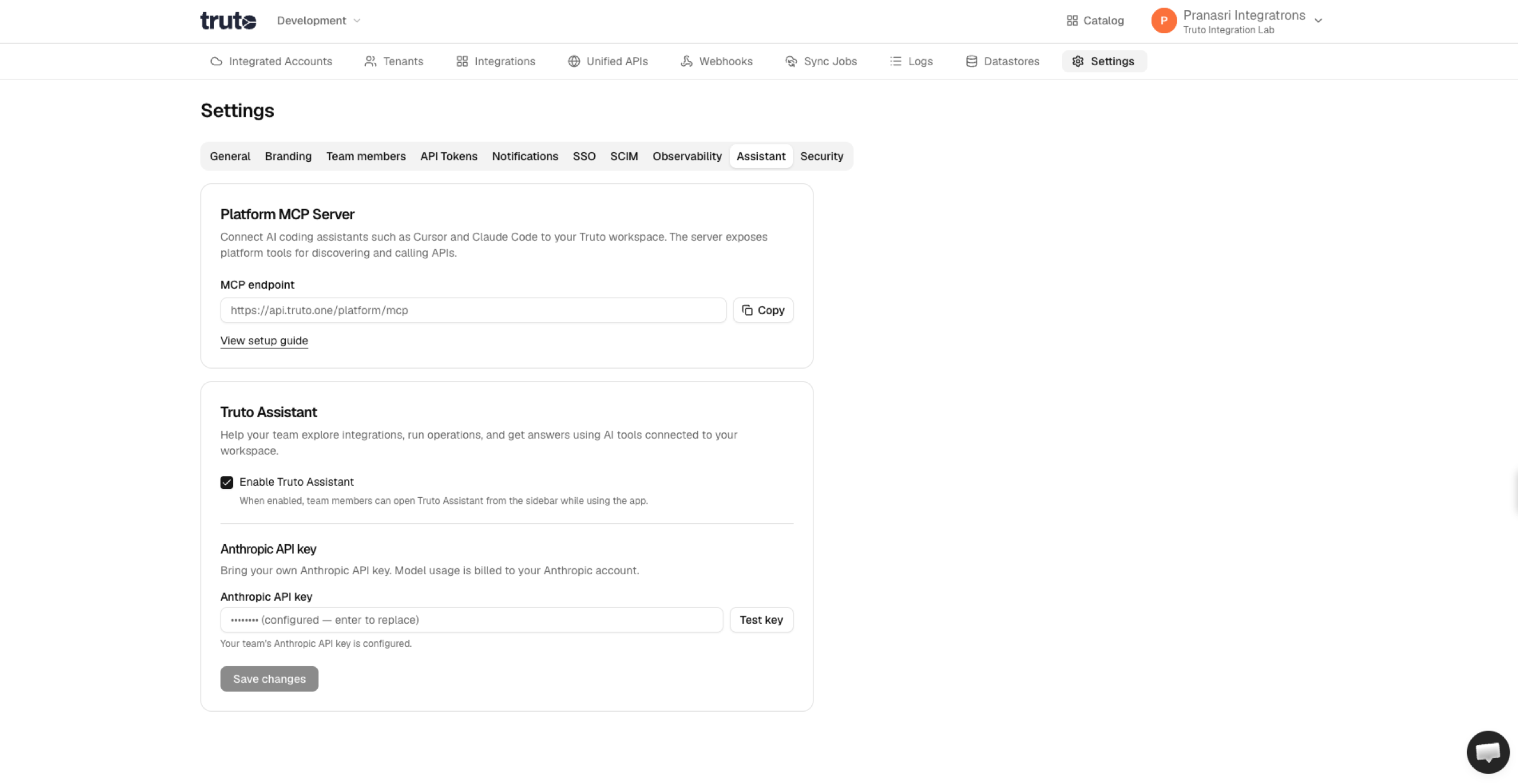
- Navigate to Settings → Assistant (the Truto Assistant page).
- Tick Enable Truto Assistant.
- Under Anthropic API key, paste your key and click Test key. Truto uses BYOK (Bring Your Own Key), so model usage is billed to your Anthropic account.
- Click Save changes.
Only team admins can configure assistant settings.
Usage
- Click the floating assistant button, which starts at the right edge of the window and can be dragged or docked to either side. Or click Ask AI on a page to start with a prompt about it. Expand the panel, or open the full-screen view at
app.truto.one/assistant. - Type a natural language question or command — for example, "List my HubSpot integrated accounts" or "What sync jobs are failing?"
- The assistant will call platform tools to gather information. Most read operations execute immediately; write operations and sensitive reads (tokens, secrets, OAuth and environment-variable paths) show an approval prompt first.
- Use the model selector in the message composer to switch models. The choice is saved for your whole team, so it applies to every member's conversations until someone changes it.
- The context meter beside the model selector shows how much of the model's context window is in use.
- Start a New chat from the conversation menu. Earlier chats stay in the list.
Available models
| Model | Strengths |
|---|---|
| Claude Sonnet 5 | Latest balanced model |
| Claude Sonnet 4.6 (default) | Balanced speed and capability — recommended for most tasks |
| Claude Opus 4.6 | Most capable reasoning — best for complex multi-step operations |
| Claude Haiku 4.5 | Fast and economical — good for simple lookups |
Any team member can switch models at any time using the selector in the message composer. The selected model is a team-wide setting.
Security
- BYOK — your Anthropic API key is stored encrypted and never shared with other teams or used outside your team.
- Approval — any tool call that would create, update, or delete a resource, or read sensitive data, requires you to click Allow before it executes. Click Deny to refuse it.
- Your permissions — the assistant acts as you and sees only what you can see in the dashboard. On a team with several environments, it searches all the environments you can access unless you ask about the one selected in the dashboard. It cannot see other teams' resources.
- Stored by Truto — your conversations are kept per user (the newest 50, up to 200 messages each). Other team members can't see them.
- Sent to Anthropic — your messages, attachments and the results of the assistant's tool calls: the integrations, integrated accounts, sync jobs, logs and settings it reads. String values under keys that look like secrets (
token,secret,password,api_keyand similar) are replaced with[REDACTED]first. The assistant doesn't call the Unified or Proxy API, so it doesn't read records from your customers' apps. Web searches and page fetches run through Anthropic's web search and web fetch tools. - No training — conversations are sent to Anthropic's API under their standard data policy (messages are not used to train models).
Check it from the API
GET /assistant/status returns whether the assistant is on for your team (enabled) and the model it uses (model).
curl https://api.truto.one/assistant/status \
  -H "Authorization: Bearer $TRUTO_API_TOKEN"
Next
To work with Truto from Claude, ChatGPT, Cursor or Claude Code instead, connect the Platform MCP server. It works in one environment and, unlike the assistant, runs changes without asking for approval.