Truto RapidBridge Overview
RapidBridge runs a sync job for one of your integrated accounts, now or on a schedule, and posts each batch of records to your webhook. This page and Creating a RapidBridge sync job cover runtime versions 1 to 3. For new jobs, use version 4; see the V4 sync job reference. Every run's log rows are under Logs → RapidBridge.
Skip the reading — fast path for coding agents
truto sync-job-runs create --sync-job-id <sync_job_id> --integrated-account-id <integrated_account_id> --webhook-id <webhook_id>/skill truto-operator
How it works
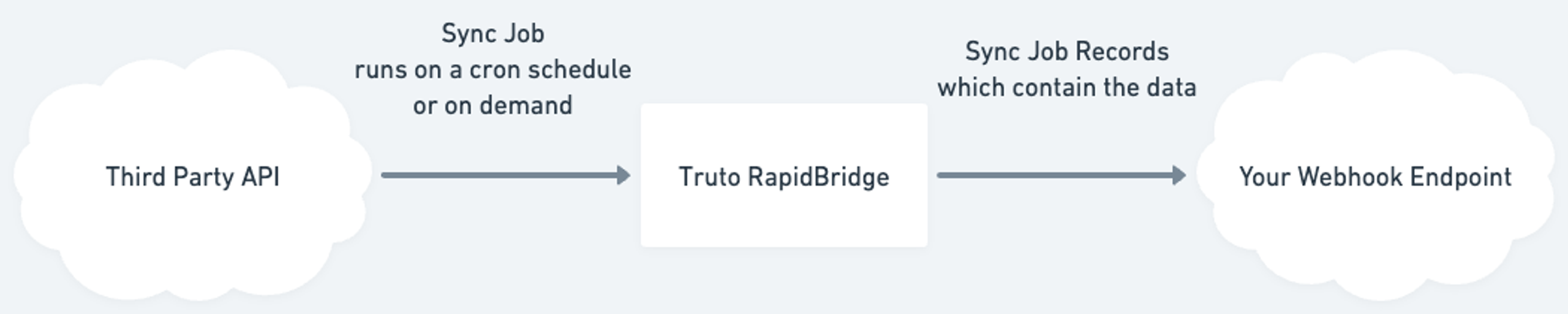
Start by setting up a sync job: the plan that lists which resources to fetch. Say you want to sync tickets, customers, and organizations from Zendesk; you list those resources in the sync job.
You can create and manage sync jobs from the dashboard under Sync Jobs in app.truto.one. See Using the Sync Jobs UI for a walkthrough of the list, detail tabs, runs, schedules, and templates.
Running the plan against one integrated account is a sync job run. To start one, you need the sync job's ID, the integrated account's ID, and the ID of your webhook, registered in Truto:
curl -X POST https://api.truto.one/sync-job-run \
  -H "Authorization: Bearer <API token>" \
  -H "Content-Type: application/json" \
  -d '{
    "sync_job_id": "<sync_job_id>",
    "integrated_account_id": "<integrated_account_id>",
    "webhook_id": "<webhook_id>"
  }'
truto sync-job-runs create \
--sync-job-id <sync_job_id> \
--integrated-account-id <integrated_account_id> \
--webhook-id <webhook_id>Here's the process in action:
- Truto sends
sync_job_run:startedto your webhook before it fetches anything. - It fetches each resource and sends every page of records to your webhook as a
sync_job_run:recordevent. - Answer each event with a 2xx. If your endpoint refuses a
sync_job_run:recordpage (after a few quick retries), versions 1 to 3 stop fetching that resource and the resources that depend on it, and version 4 drops the page. Either way the run carries on and can still endcompleted.
When every resource is fetched, Truto sends sync_job_run:completed.
Webhook event sequence
-
sync_job_run:created: the run exists. Truto sends it to every webhook in the environment that subscribes to it, not only the run's webhook. -
sync_job_run:started: sent before any data is fetched, unless the run'sevents_to_sendleaves it out. On versions 1 to 3, answer it with a400to fail the run before it fetches anything. Version 4 ignores the answer. -
sync_job_run:record: each time Truto fetches a page of a resource, whether it holds one record or a batch, it sends the records in this event. This repeats until every resource in the sync job is fetched. The event looks like this:{ "event": "sync_job_run:record", "payload": { "resource": "ticketing/tickets", "records": [{ "id": "1001", "subject": "Printer is on fire" }], "integrated_account_id": "<integrated_account_id>", "sync_job_run_id": "<sync_job_run_id>", "meta": { "method": "list", "next_cursor": "<cursor>" } } }Anything you pass as
metawhen you start the run is copied into each event'smeta. -
sync_job_run:record_error: a fetch failed. Whether this event is sent depends on theerror_handlingsetting; with its default,ignore, it is. -
sync_job_run:rate_limited: the integration's API rate-limited the run, so the sync pauses. The run's status readsrate_limitedmeanwhile. Truto waits as long as the provider'sRetry-Afterasks, or 60 seconds;retryAfterin the payload is that wait in milliseconds. Then the sync resumes withsync_job_run:recordevents. -
sync_job_run:completedorsync_job_run:failed: the run ended.sync_job_run:completedmeans every resource was fetched.sync_job_run:failedmeans a critical error stopped the run. On runtime version 1, settingerror_handlingtofail_fastalso ends the run withsync_job_run:failedon the first error.
A run you stop, with Stop run or DELETE /sync-job-run/{id}, ends with sync_job_run:deleted instead, sent to every webhook that subscribes to it.
Next
Build a job step by step in Creating a RapidBridge sync job. For new jobs, start from the V4 sync job reference. To manage jobs, runs and schedules in the dashboard, see Using the Sync Jobs UI.