JSONata bindings in Truto Unified APIs
Every Unified API mapping is a JSONata expression, and bindings are the names it reads its input from: query for the call's query parameters, response for the provider's record, context for the integrated account's values, and so on. Each mapping gets a different set.
Skip the reading — fast path for coding agents
truto jsonata eval --expression-file mapping.jsonata --input bindings.json/skill truto-jsonata
Bindings by mapping
| Binding | Query | Request body | Request headers | Path | Error | Response | Response headers | Partial response | Steps |
|---|---|---|---|---|---|---|---|---|---|
query |
All | Sent | Sent | Sent | Sent | Sent | Sent | Sent | All |
rawQuery |
— | Yes | Yes | Yes | Yes | Yes | Yes | Yes | — |
body |
Caller's and default | Caller's | Sent | Sent | Sent | Sent | Sent | — | Caller's |
requestBody |
— | — | Yes | — | — | — | — | Yes | — |
rawBody |
— | — | — | — | — | — | — | Yes | — |
headers |
— | — | Request | Request | Request | Response | Response | — | — |
context |
Yes | Yes | Yes, with id and before |
Yes | Yes | Yes, with id, before and integrated_account_id |
Yes, with id and before |
— | Account only |
before |
Yes | Yes | context.before |
Yes | Yes | context.before |
context.before |
Yes | — |
id |
Yes | Yes | context.id |
Yes | Yes | context.id |
context.id |
Yes | Yes |
response |
— | — | — | — | — | Yes | Yes | — | — |
error |
— | — | — | — | Yes | — | — | — | — |
data |
— | — | — | — | — | — | — | Yes | Yes |
step |
— | — | — | — | — | — | — | — | Yes |
What each binding holds:
query: in the query mapping and in steps, All means every query parameter of the call, includingintegrated_account_id,limit,next_cursorandtruto_*parameters; the query mapping also gets the method's default query. Everywhere else, Sent means the query Truto sends to the provider: the method's default query,limit,next_cursor,truto_*parameters, the query mapping's result, andremote_query.rawQuery: the caller's query parameters withoutintegrated_account_id,limit,next_cursorandtruto_*parameters.body: in the request body mapping and in steps, the body the caller sent. In the query mapping, the method's default body merged with the caller's body. Everywhere else, Sent means the body sent to the provider, after the request body mapping.requestBody: the body the caller sent, before the request body mapping.rawBody: the request body as an array buffer, for providers that take data in another format, such as base64.headers: in the request header mapping, the headers Truto has prepared for the provider request. Of the headers sent to the Unified API, onlycontent-typeis carried over, and only on writes. In the path and error mappings, the request headers after the request header mapping. In the response and response header mappings, the headers the provider returned.context: the integrated account's context (its connection fields, credentials and saved variables). In a sync job run it also holds the run's values, such astotal_records_size. For example,context.subdomainis the subdomain the user entered when connecting. In steps, it is the account's context only.before: the data the before steps produced. Some mappings read it ascontext.before.id: the path parameter of aget,updateordeletecall, such as<id>in/unified/crm/accounts/<id>. Empty forlist. Some mappings read it ascontext.id.response: in the response mapping, the provider's response. For alist(and any custom method), the mapping runs once per record andresponseis that record. In the response header mapping, the response object, withresultalready mapped.error: the provider's error body, as JSON or text. For integrations that declare an error expression, it is{ "data": …, "headers": … }instead. The HTTP status code is not a binding.data: in the partial response expression, the mappedresult. In steps, the data so far: before steps start with an empty object, after steps with the Unified API response.step: the results of the earlier steps, keyed by step name (or by the step's position when it has no name). For example,step.get_owneris the result of the step namedget_owner.
Truto adds the raw record to every mapped record as remote_data, unless the response mapping sets remote_data itself. Callers drop it with truto_ignore_remote_data=true.
Query mapping
The query mapping turns the call's query parameters into the query the provider accepts.
Scenario: the caller filters accounts by contact.id, and the provider filters by a person_id parameter.
Query mapping:
{
  "person_id": query.contact.id
}query.contact.idreads thecontact.idparameter from the caller's request.person_idis the parameter the provider accepts.
Example Unified API request:
GET /unified/crm/accounts?integrated_account_id=<integrated_account_id>&contact[id]=12345Mapped query parameters:
{
  "person_id": "12345"
}
Body mappings
The request body mapping turns the caller's body into the body the provider accepts.
Request body mapping:
{
  "fullName": body.name
}body.namereads thenamefield from the caller's body.fullNameis the field the provider accepts.
Header bindings
The request header mapping returns headers to send to the provider. The headers sent to the Unified API itself aren't available, so take values from context, query or body.
Request header mapping:
{
  "x-api-version": "2024-01",
  "x-account-region": context.region
}x-api-versionis a fixed header the provider requires.context.regionreads aregionvalue saved on the integrated account.
Request path bindings
The path mapping must return the provider path as a string.
Request path mapping:
"/users/" & query.user_idquery.user_idreads the mappeduser_idparameter.- The returned string, for example
/users/12345, is the path of the request to the provider.
Error bindings
The error mapping reads the provider's error from error and returns status, message, metadata and, for a status below 400, response. See Error mapping for what the caller receives.
Response bindings
For a list (and any custom method), the response mapping runs once per record, and response is that record. Inside response.{ … }, names resolve against the record, so reach the other bindings from the root with $$: $$.context.subdomain, $$.query.status. A bare context.subdomain or query.status inside response.{ … } looks for a field on the record and returns nothing.
Response mapping:
response.{
  "id": Id,
  "owner": { "id": OwnerId },
  "name": Name,
  "url": "https://" & $$.context.subdomain & ".lightning.force.com/lightning/r/Account/" & Id & "/view"
}Idmaps Salesforce'sIdtoid.OwnerIdmaps to a nestedowner.id.Namemaps toname.$$.context.subdomainreads the account's subdomain from outside the record.
Final API response (for an account whose subdomain is acme):
{
  "id": "0012w000024KwDeAAK",
  "owner": {
    "id": "0052w00000CkYXHAA3"
  },
  "name": "Acme Corp",
  "url": "https://acme.lightning.force.com/lightning/r/Account/0012w000024KwDeAAK/view"
}
Response header bindings
The response header mapping returns headers to add to the Unified API response. It reads the provider's headers as headers and the mapped response as response. The object it returns is merged over the provider's headers.
Partial response
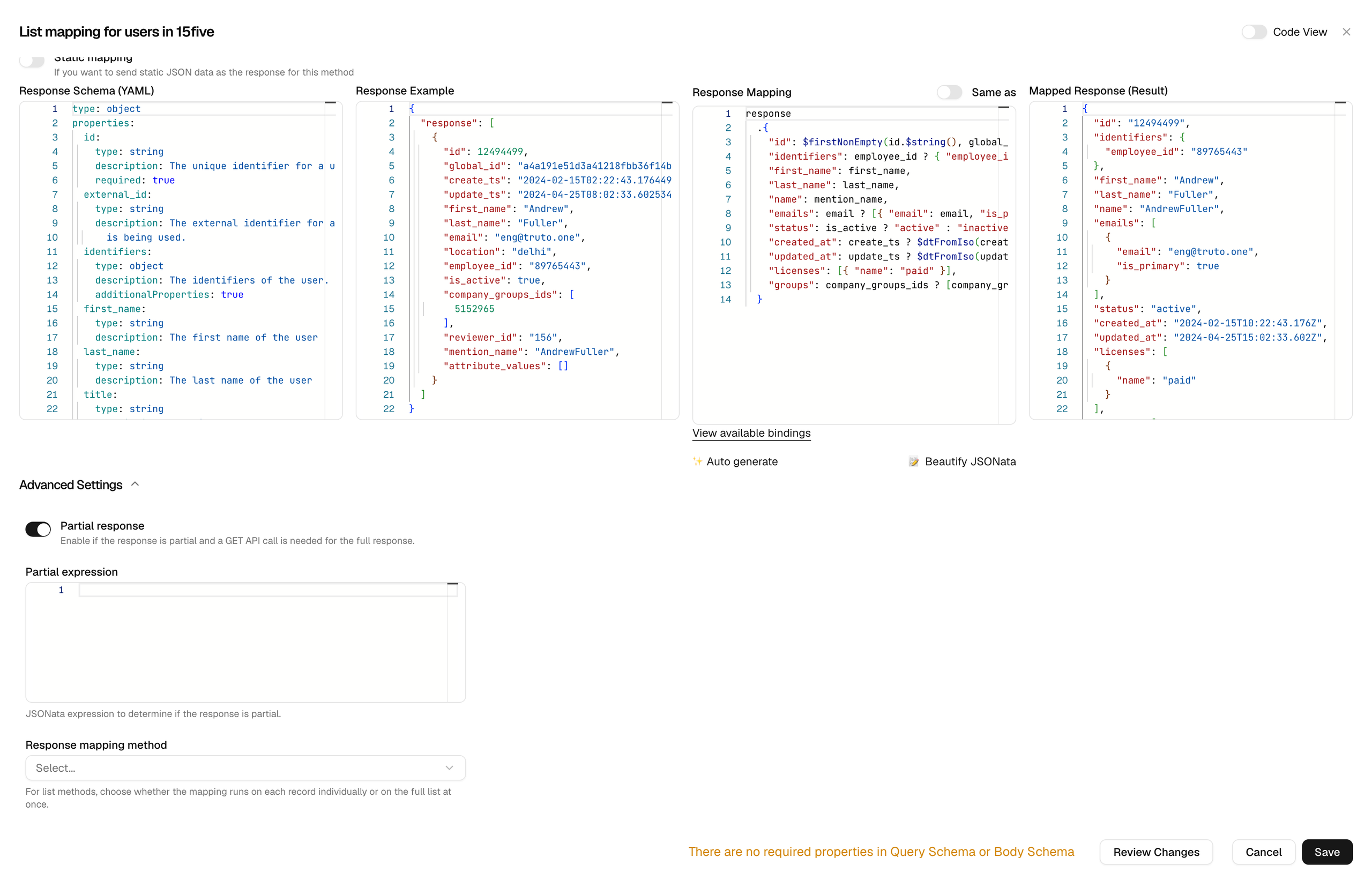
Turn on Response mapping → Advanced Settings → Partial response when a list endpoint returns only some fields. The list response then carries "is_partial_response": true, telling the caller to call get for full records. Truto doesn't fetch them. To decide per call, enter a Partial expression that returns true or false. Any other result, or an error, leaves the flag out.
Before/After steps
Steps read query, body, id, context, data and step, as listed in the table above. In form mode, the ID, Query parameters and Request Body fields take {{…}} placeholders over the same names, for example {{query.interview_id}}. See Before steps for how steps run.
Practical example
Map contact.id to the provider's person_id filter, then return it on each record.
Step 1: Define the query mapping
{
  "person_id": query.contact.id
}
Example request:
GET /unified/crm/accounts?integrated_account_id=<integrated_account_id>&contact[id]=12345Mapped query parameters:
{
  "person_id": "12345"
}
Step 2: Define the response mapping
Option 1: using the query binding. query holds the mapped query, so person_id is there:
response.{
  "id": Id,
  "contact": {
    "id": $$.query.person_id
  }
}
Option 2: using the rawQuery binding. rawQuery holds the caller's query, so contact.id is there:
response.{
  "id": Id,
  "contact": {
    "id": $$.rawQuery.contact.id
  }
}
Both return:
{
  "id": "0012w000024KwDeAAK",
  "contact": {
    "id": "12345"
  }
}
JSONata functions
Mappings can use every function in Truto JSONata. These are the ones most mappings need:
| Function | Use it to |
|---|---|
$mapValues(value, mapping) |
Map provider values to unified enum values, for example $mapValues(status, { "Open": "open", "Closed": "closed" }). Keys match case-insensitively. |
$firstNonEmpty(a, b, …) |
Return the first argument that isn't null or missing. |
$dtFromIso(value), $dtFromFormat(value, format) |
Parse a date from ISO 8601 or from a given format. |
$removeEmpty(array), $removeEmptyItems(array) |
Leave a field out when its array is empty ($removeEmpty returns nothing for []), or drop the empty items from an array ($removeEmptyItems drops null, "", {}, and also 0 and false). |
$jsonParse(string) |
Parse a JSON string. Returns null when the string isn't valid JSON. |
$convertQueryToSql(query, keysToMap, mapping, dataTypes, customOperatorMapping, options) |
Build a SQL-style WHERE clause from the caller's filters, as Truto's Salesforce mappings do. |
Two traps:
$mapValuesreturns the provider's value unchanged when no key matches, so an unmapped status leaks into your enum. Its default argument applies only when the value isnullor missing.$firstNonEmptyskips onlynulland missing values, so an empty string""wins.
Test a mapping
The mapping editor's example is the expression's whole input. Put query, context or before keys next to response to test a mapping that reads them. To evaluate a mapping on your machine, and to see the raw provider response of a live call, see Test and debug a mapping.
Next
Creating Unified APIs walks through each mapping in the dashboard. To change a mapping for one environment or one integrated account, see Overriding Unified API mappings.