Overriding Unified API mappings
Override a Unified API mapping when some of your customers keep data in fields Truto's mapping doesn't read, such as custom fields. An environment override changes the mapping for every integrated account in the environment. An integrated account override changes it for one integrated account.
Skip the reading — fast path for coding agents
truto env-unified-model-mappings list --integration-name hibob --resource-name employees/skill truto-unified-mappings
How overrides are applied
Environment and integrated account overrides combine with the base mapping differently.
- Environment override. Truto merges the override into the base mapping, field by field, for every integrated account in the environment. Each JSONata field you set (
response_mapping,query_mapping,request_body_mapping, and so on) replaces that whole field in the base mapping. Object fields such asquery_schemaare merged key by key, lists such asbeforeare replaced whole, and you can't remove a base key. Fields you don't set keep the base mapping. Aresponse_mappingoverride is the complete expression for the response, so it must return every unified field you want, not only the new ones. - Integrated account override. Truto evaluates the account's expressions against the same input as the base mapping (for
response_mapping, the raw record inresponse) and merges their results over the results from step 1. An account override only needs the fields you want to change or add.
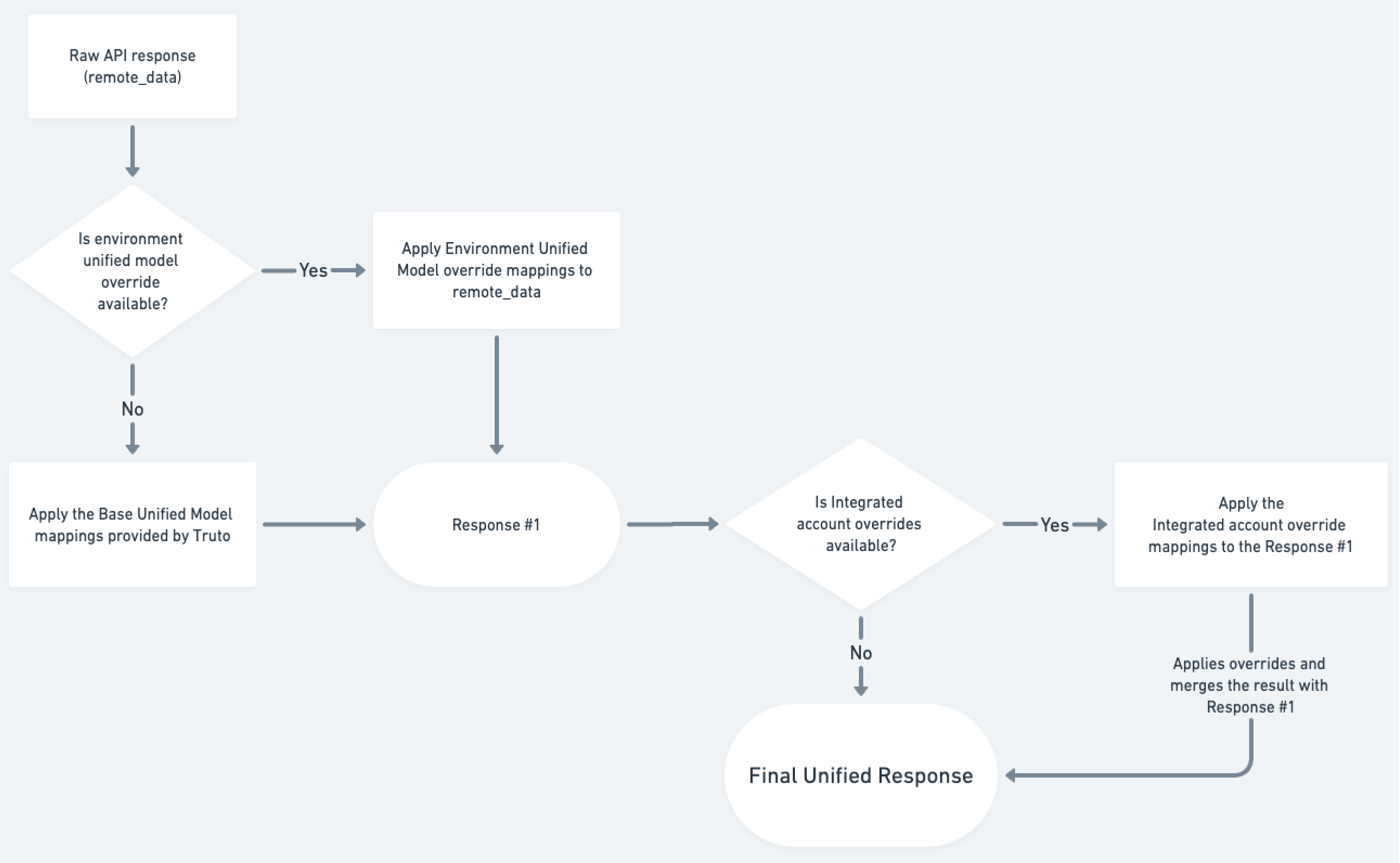
An integrated account override can set these fields, on the list, get, create, update and delete methods only:
| Field | Effect of an integrated account override |
|---|---|
response_mapping |
Evaluated against the same raw record as the base mapping. Its result is merged over each mapped record, top-level keys only, so a returned custom_fields object replaces the base one whole. A string result replaces the whole record. |
query_mapping |
Its result is merged over the base mapping's query. Return "truto_replace": true to make the override's result the whole query. |
request_body_mapping |
Its result is deep-merged into the base mapping's body. |
resource, method |
Used in place of the base mapping's integration resource or method. |
related_resources, response_mapping_method |
Used in place of the base value. |
query, body, query_schema, request_body_schema, file_upload, side_load, before, after |
Accepted, but not used. |
Any other field, such as path_mapping, error_mapping, request_header_mapping, response_header_mapping or static, and any custom method key, is rejected with 400.
An account's query_mapping, request_body_mapping or response_mapping runs only when the environment or base mapping for that method has the same field. Otherwise Truto ignores it without an error. Use an environment override for anything else, including error, path and header mappings, custom methods, and mappings the base doesn't have.
How to specify an override for an integrated account
This example adds probation_end_date to HiBob's hris/employees list response for one integrated account. Truto's HiBob mapping already asks HiBob for the field but doesn't return it.
unified_model_override is replaced, not merged, when you update an integrated account, so read it first and send it back whole.
- Read the account's current overrides and copy
unified_model_override:
curl https://api.truto.one/integrated-account/<integrated_account_id> \
  -H 'Authorization: Bearer <API token>'
truto accounts get <integrated_account_id> --select unified_model_override -o json- Add your method to that object, then send the whole object back. This example assumes the account had no other overrides. If step 1 returned any, include them in the body too.
curl -X PATCH https://api.truto.one/integrated-account/<integrated_account_id> \
  -H 'Authorization: Bearer <API token>' \
  -H 'Content-Type: application/json' \
  -d '{
    "unified_model_override": {
      "hris": {
        "employees": {
          "list": {
            "response_mapping": "response.{ \"probation_end_date\": `/internal/probationEndDate`.value }"
          }
        }
      }
    }
  }'
truto accounts update <integrated_account_id> -b '{
"unified_model_override": {
"hris": {
"employees": {
"list": {
"response_mapping": "response.{ \"probation_end_date\": `/internal/probationEndDate`.value }"
}
}
}
}
}'unified_model_override is replaced, not merged. A PATCH that sends only hris.employees.list removes every other override on the account. Send {} to remove all of them.
The request body contains the following:
unified_model_override: the object that holds the overrides.hris: the name of the Unified API. You can find it on the Unified API's page in the dashboard.employees: the resource to override.list: the method to override.response_mapping: a JSONata expression. It runs once per record, andresponseis HiBob's raw record. Truto merges its result over the base mapping's result, so it returns only the new field.
Truto's HiBob list mapping has no query_mapping, so an account-level query_mapping on this method would never run.
The override applies on the account's next call. Call List employees (GET /unified/hris/employees) for the integrated account, and each employee now has probation_end_date.
How to specify an override for an environment
Override a mapping for every integrated account in one environment from the dashboard:
1. Open the mapping
- Open Unified APIs in the dashboard and open the installed Unified API.
- Open the Resources tab, select the resource, and switch to its Mapping tab.
- From the Integration dropdown, choose the integration. It lists only the integrations installed and enabled in this environment.
- Click the edit (pencil) icon next to the method you want to override.
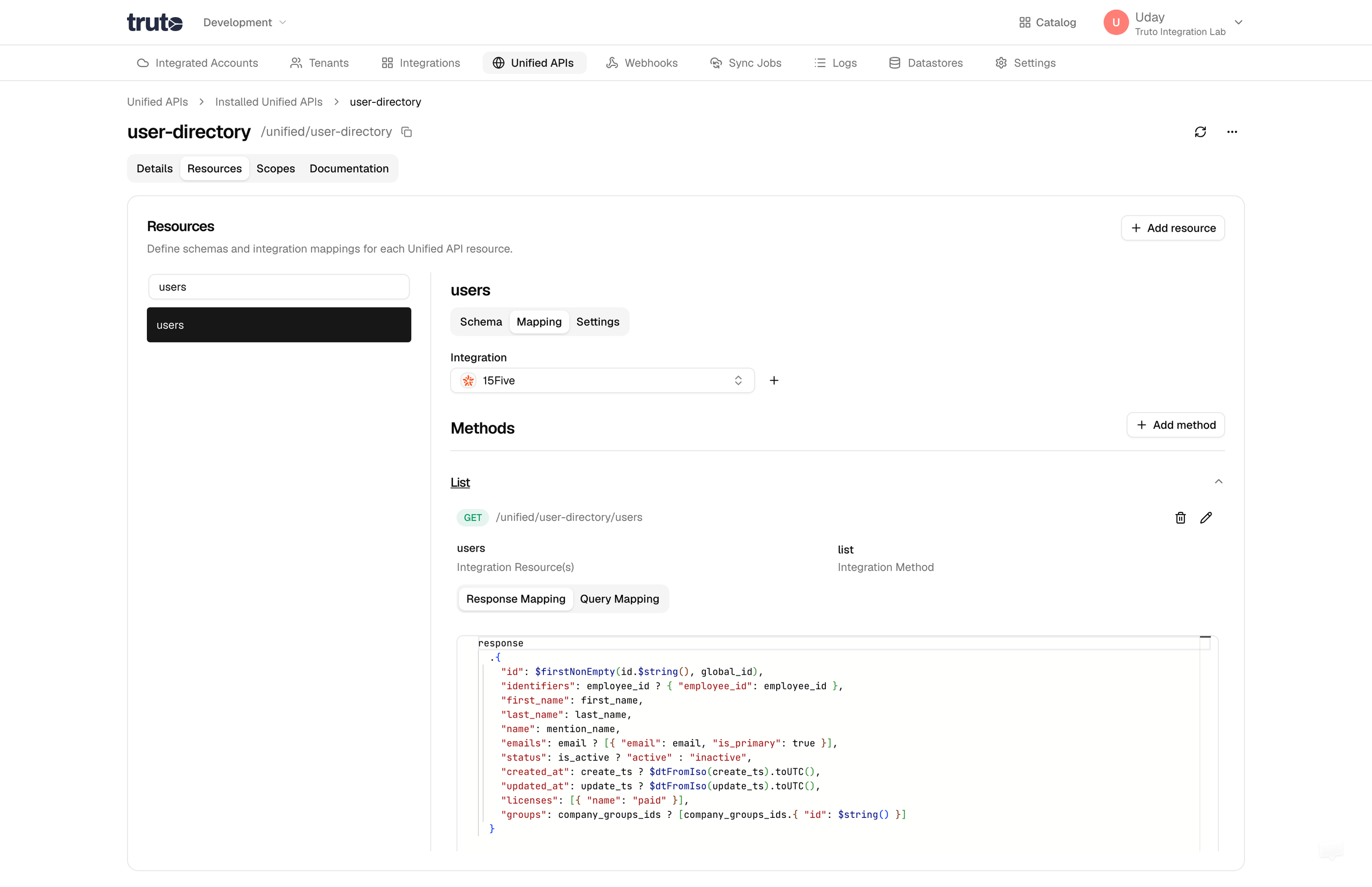
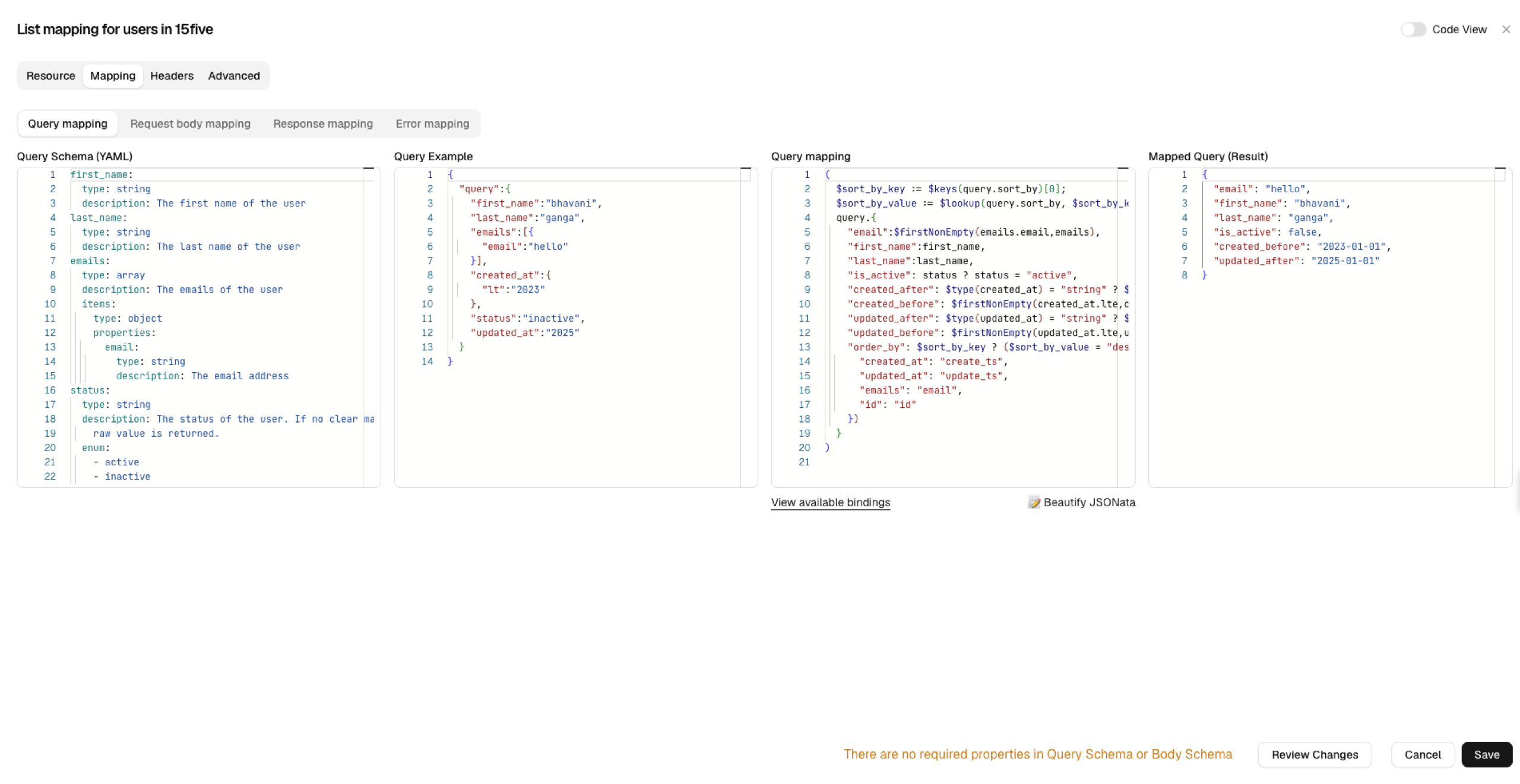
2. Edit the mapping
The modal groups its tabs:
- Resource: the integration resource and method this unified method calls.
- Mapping: Query mapping, Request body mapping, Response mapping and Error mapping.
- Headers: Request header mapping and Response header mapping.
- Advanced: Before/After Steps and Notes.
Turn on Code View to edit the whole configuration as YAML:
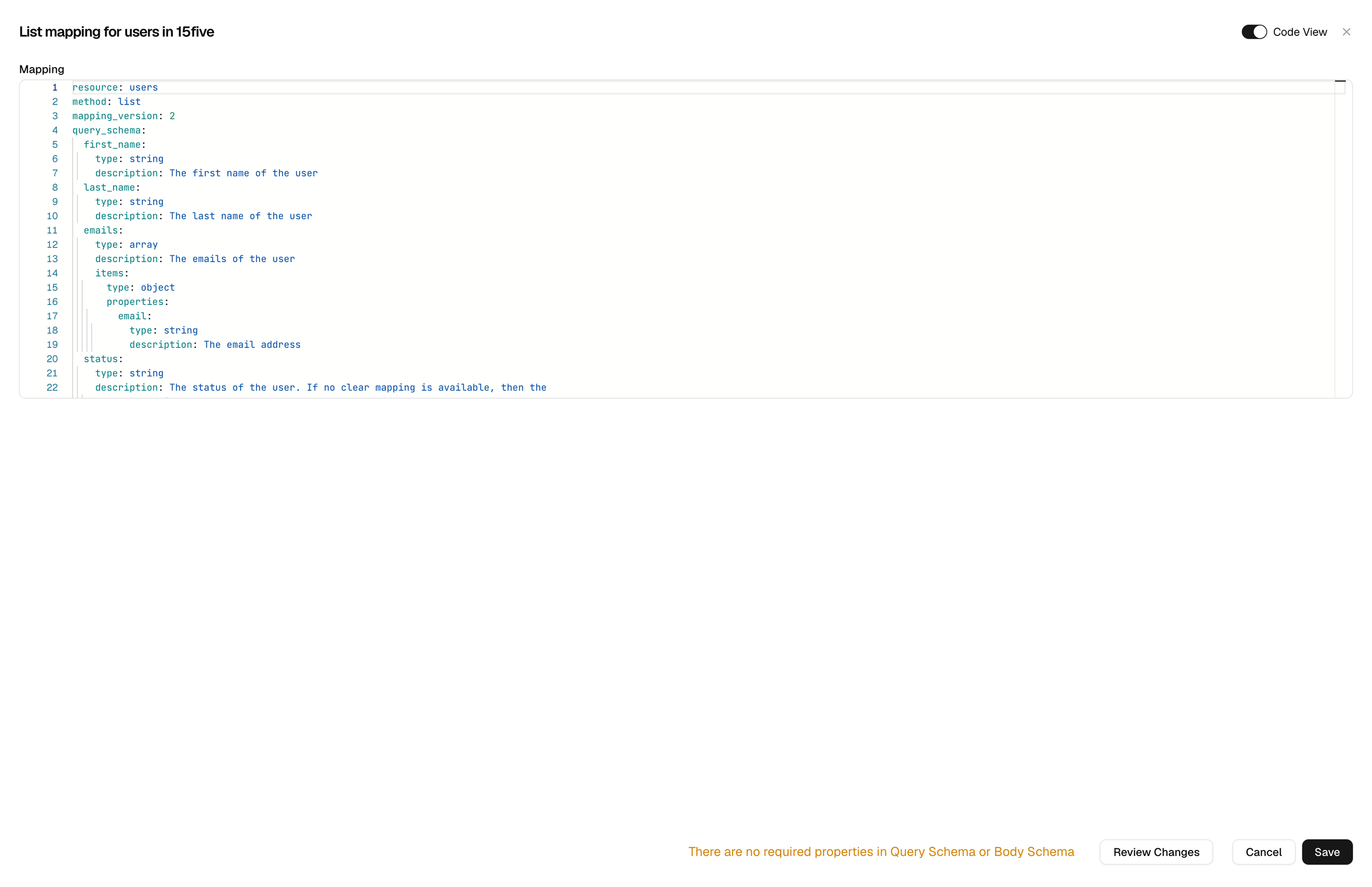
Remove fields you don't need, add fields or parameters, or change the JSONata that builds them.
3. Save
Click Save, review the changes, and click Confirm. The confirmation reads "The changes will only be saved for the selected environment. Proceed?"
The dashboard saves only what differs from Truto's mapping, and removes the override when nothing differs. A field you override keeps your version even when Truto later updates the base mapping. To go back:
- Revert to original, under a field, restores Truto's version of that field.
- History, in the mapping modal, compares and restores earlier versions of the mapping. The page's Version history menu item does the same for the whole Unified API.
- Import from other Environment, in the page's menu on the details tab, copies overrides from another environment.
The change can take a while to reach API calls. See When changes take effect.
How to specify an override for an environment through the API
This example adds probation_end_date to HiBob's hris/employees list response for every integrated account in the environment.
- Get the ID of the installed Unified API. The
idof the returned record is theenvironment_unified_model_id.
curl 'https://api.truto.one/environment-unified-model?unified_model.name=hris' \
  -H 'Authorization: Bearer <API token>'
truto env-unified-models list --unified-model-name hris- Create an environment override for the resource, integration and method.
curl -X POST https://api.truto.one/environment-unified-model-resource-method \
  -H 'Authorization: Bearer <API token>' \
  -H 'Content-Type: application/json' \
  -d '{
    "environment_unified_model_id": "<environment_unified_model_id>",
    "resource_name": "employees",
    "integration_name": "hibob",
    "method_name": "list",
    "config": {
      "response_mapping": "response.{ /* every field from the base response_mapping */ \"id\": $string(id), \"probation_end_date\": `/internal/probationEndDate`.value }"
    }
  }'
truto env-unified-model-mappings create -b '{
"environment_unified_model_id": "<environment_unified_model_id>",
"resource_name": "employees",
"integration_name": "hibob",
"method_name": "list",
"config": {
"response_mapping": "response.{ /* every field from the base response_mapping */ \"id\": $string(id), \"probation_end_date\": `/internal/probationEndDate`.value }"
}
}'The request body contains the following:
environment_unified_model_id: the ID of the installed Unified API from step 1.resource_name: the resource to override.integration_name: the integration to override.method_name: the method to override.config: the mapping fields to override. Each JSONata field you set replaces the base field. Object fields such asquery_schemaare merged key by key, lists such asbeforeare replaced whole, and you can't remove a base key.response_mapping: a JSONata expression.responseis HiBob's raw record. This expression replaces the baseresponse_mapping, so start from the base mapping and addprobation_end_dateto it. To see the mapping currently in effect, callGET /environment-unified-model-resource-method?environment_unified_model_id=<environment_unified_model_id>&resource_name=employees&integration_name=hibob&apply_overrides=true.
Each environment can have one override per resource, integration and method. To change an existing override, find its id and current version with GET /environment-unified-model-resource-method?environment_unified_model_id=<environment_unified_model_id>&resource_name=employees&integration_name=hibob&method_name=list, then send a PATCH request with the complete config you want. The config you send replaces the stored one, and a stale version is rejected with a 400.
curl -X PATCH https://api.truto.one/environment-unified-model-resource-method/<id> \
  -H 'Authorization: Bearer <API token>' \
  -H 'Content-Type: application/json' \
  -d '{
    "version": <version>,
    "config": {
      "response_mapping": "response.{ /* every field from the base response_mapping */ \"id\": $string(id), \"probation_end_date\": `/internal/probationEndDate`.value }"
    }
  }'
To remove the override and fall back to the base mapping, send DELETE /environment-unified-model-resource-method/<id>.
Once the change takes effect, List employees (GET /unified/hris/employees) returns probation_end_date for every integrated account in the environment.
When changes take effect
A saved change to a mapping, an environment override or a Unified API's schema can take up to about 23 minutes to reach API calls, because each connection caches them. To apply it now, call POST /integrated-account/refresh-mapping-cache; pass integration_id when you changed one integration's mapping. It answers 202, and a region can keep serving the old mapping for up to about 6 more minutes. An integrated account's own unified_model_override applies on the next call.
curl -X POST https://api.truto.one/integrated-account/refresh-mapping-cache \
  -H 'Authorization: Bearer <API token>' \
  -H 'Content-Type: application/json' \
  -d '{"integration_id":"<integration_id>"}'
truto accounts refresh-mapping-cache -i <integration_id>Test an override
truto unified test-mapping --with-overrides <environment_unified_model_id> evaluates the base mapping with your environment overrides against a sample response, without calling the integration. See Test and debug a mapping.
Bindings and JSONata functions
The data a mapping can read, such as response, query, rawQuery, body and context, is listed per mapping in JSONata bindings. The same page lists the JSONata functions mappings use most.
Next
JSONata bindings lists what each mapping can read. To build a Unified API of your own, see Creating Unified APIs.