Creating tenants
You can create tenants explicitly (recommended when you want metadata in place before the customer connects), or let Truto auto-create them on first connection. This page covers the explicit paths.
Skip the reading — fast path for coding agents
truto tenants create --id acme-corp --name 'Acme Corp'/skill truto
From the dashboard
- Sign in to your Truto account.
- Open Tenants in the top navigation, or open
https://app.truto.one/tenantsdirectly.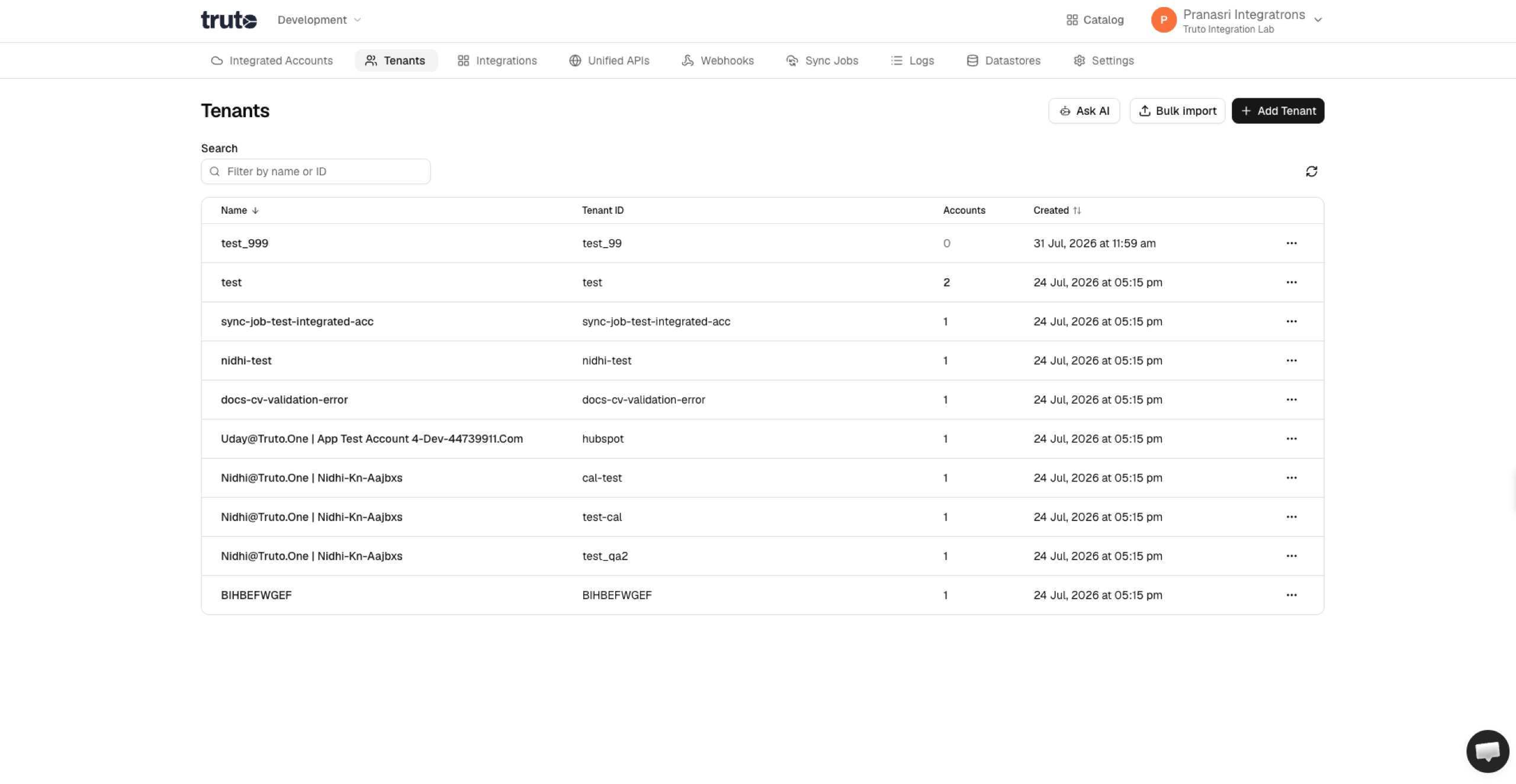
- Click Add Tenant in the top-right.
- Fill in the fields:
- Tenant ID (required) — your identifier for this customer. Any string up to 255 characters, without control characters or leading/trailing whitespace, and not
.or... Immutable once set. - Name (required in the dashboard) — a display name. Spaces alone fall back to the tenant ID.
- Metadata (JSON) (optional) — a JSON object.
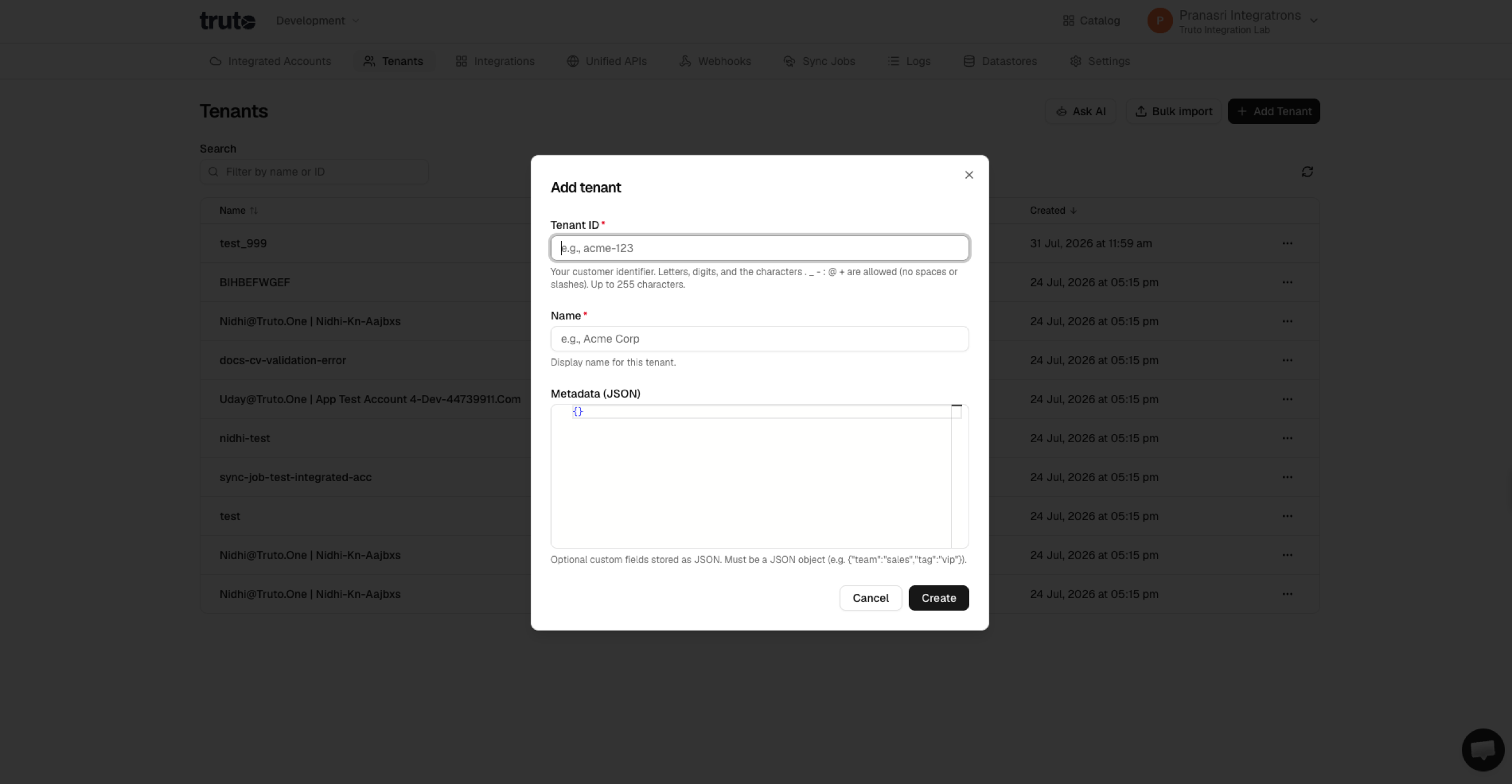
- Tenant ID (required) — your identifier for this customer. Any string up to 255 characters, without control characters or leading/trailing whitespace, and not
- Click Create.
The new tenant appears in the list. Click into it to see (or bulk-delete) all integrated accounts owned by that tenant.
From the API
Truto uses Bearer authentication — replace <your-api-token> with an API token from your target environment.
curl --location 'https://api.truto.one/tenant' \
--header 'Content-Type: application/json' \
--header 'Authorization: Bearer <your-api-token>' \
--data '{
    "id": "acme-corp",
    "name": "Acme Corp",
    "metadata": {
        "tier": "gold",
        "region": "wnam"
    }
}'
truto tenants create -b '{"id":"acme-corp","name":"Acme Corp","metadata":{"tier":"gold","region":"wnam"}}'tenant = await truto_api.tenants.create({
"id": "acme-corp",
"name": "Acme Corp",
"metadata": {"tier": "gold", "region": "wnam"},
})Response (201 Created):
{
  "id": "acme-corp",
  "environment_id": "…",
  "name": "Acme Corp",
  "metadata": { "tier": "gold", "region": "wnam" },
  "created_at": "2026-07-02T09:14:03.000Z",
  "updated_at": "2026-07-02T09:14:03.000Z"
}
Fields
| Field | Type | Required | Description |
|---|---|---|---|
id |
string | Yes | Your identifier for the tenant. 1–255 characters; no control characters, no leading or trailing whitespace, not . or ... URL-encode it in /tenant/:id paths. Immutable. |
name |
string | No | Display name. 1–255 characters after trimming; can't be blank. Defaults to id when omitted. |
metadata |
object | No | A JSON object; keys can't be blank. Stored and returned verbatim. |
id is unique within an environment. Attempting to create the same ID twice in the same environment returns 409 Conflict.
From the CLI
truto tenants create -b '{"id":"acme-corp","name":"Acme Corp","metadata":{"tier":"gold"}}'
truto tenants list
truto tenants get acme-corp
See Admin resources — Tenants for the full command surface, filters, and bulk create.
Letting Truto auto-create
If you skip the explicit create and just connect an account — via POST /link-token followed by a successful connection, or a direct POST /integrated-account — with a new tenant_id, Truto creates the tenant a moment after the integrated account is created (not when the link token is minted), provided the ID matches the allowed pattern. Moving an account to a new tenant_id with PATCH /integrated-account/:id creates it the same way. The auto-created tenant has:
id= the value you passedname= the same valuemetadata={}
You can PATCH it later to add metadata or change the display name. Auto-create keeps the "no setup for the customer" flow but denies you a place to attach billing/tier fields ahead of time — pick based on what your onboarding needs.
The Connections widget needs the tenant first: minting a session token for a tenant that doesn't exist answers 404 Tenant not found, unless you pass create_tenant_if_missing: true.
Updating a tenant
Only name and metadata can be changed. The id can't.
curl --location 'https://api.truto.one/tenant/acme-corp' \
--request PATCH \
--header 'Content-Type: application/json' \
--header 'Authorization: Bearer <your-api-token>' \
--data '{
    "metadata": { "tier": "platinum" }
}'
truto tenants update acme-corp -b '{"metadata":{"tier":"platinum"}}'tenant = await truto_api.tenants.update("acme-corp", {"metadata": {"tier": "platinum"}})metadata on PATCH replaces the whole object; merge on the client side if you want partial updates.
A change to metadata applies from the next catalog read, so a tenant can gain or lose integrations that a Who can see this rule gates. See Metadata.
Next
To add many tenants at once, see Bulk import. To remove one, see Deleting tenants, including the guard that refuses tenants with integrated accounts. Once a tenant exists, connect its first account.